Windows 10/11 · Vast.ai · Version 0.4.0
Manage Vast.ai GPU rentals from your Windows PC.
CheapFleet brings offer search, rental review, monitoring, and teardown requests into one local app. You approve each real rental.
This is a Windows controller, not a Windows cloud desktop. Your remote workload still needs a compatible container and setup. Buying CheapFleet does not buy GPU time or make a Windows-only workload run on a Linux container.
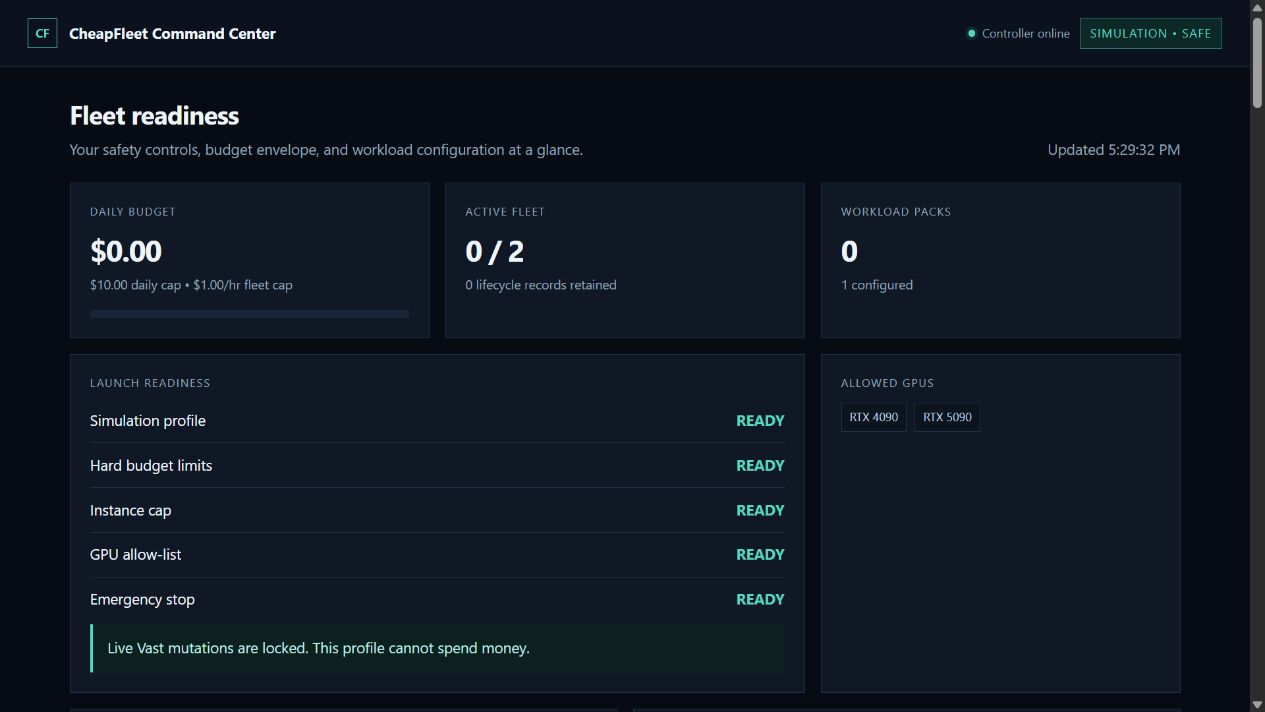
Product screenshot: simulation mode, not proof of a paid rental or a completed workload.
What changes in your rental workflow?
- Save your workload and choose hardware, price, and host requirements.
- Search for matching offers and review the rental plan.
- Approve the specific live rental after checking its price and runtime.
- Keep CheapFleet running to monitor status and request teardown at the approved deadline.
Keep backups and verify remaining resources in Vast.ai. A local deadline is not a guarantee against provider failures, network outages, or additional storage charges.
When CheapFleet is a fit
You already use Vast.ai, work from Windows, and want a repeatable, supervised rental workflow with price and runtime controls. You are comfortable providing your own workload and checking provider billing.
When you may not need it
If you rent occasionally and are happy with Vast.ai’s console, you may not need another tool. CheapFleet 0.4.0 is also not a fit if you need a Mac/Linux desktop app, continuous unattended purchasing, guaranteed job completion, or a ready-made remote Windows desktop.
What you need before a live rental
- Windows 10 or 11 and an internet connection.
- A funded Vast.ai account and your API key configured locally.
- A compatible container image and startup command for your job.
- A plan for saving results and checking rental cleanup.
The initial configuration is simulation-first with live authorization off. CheapFleet reads the API key from the operating-system environment; do not send it to support.
Check rental costs before you start →
CheapFleet is independent and is not affiliated with or endorsed by Vast.ai. No guaranteed savings, compatibility, or uninterrupted teardown. For provider setup, see the official Vast.ai quickstart.